directory-pipeline
Turn a public digital archive URL into a structured, browsable CSV — no manual transcription, no custom code per collection type.
Give it a URL from the Library of Congress, Internet Archive, NYPL Digital Collections, or any institution that publishes a public IIIF manifest. It downloads the scans, OCRs them, and extracts entries into a structured CSV. With the enrichment steps, every row links back to the exact location in the original scan.
Built for digitized historical directories — city directories, gazetteers, trade directories — but works on just about any historical document with regularl entry-like structure.
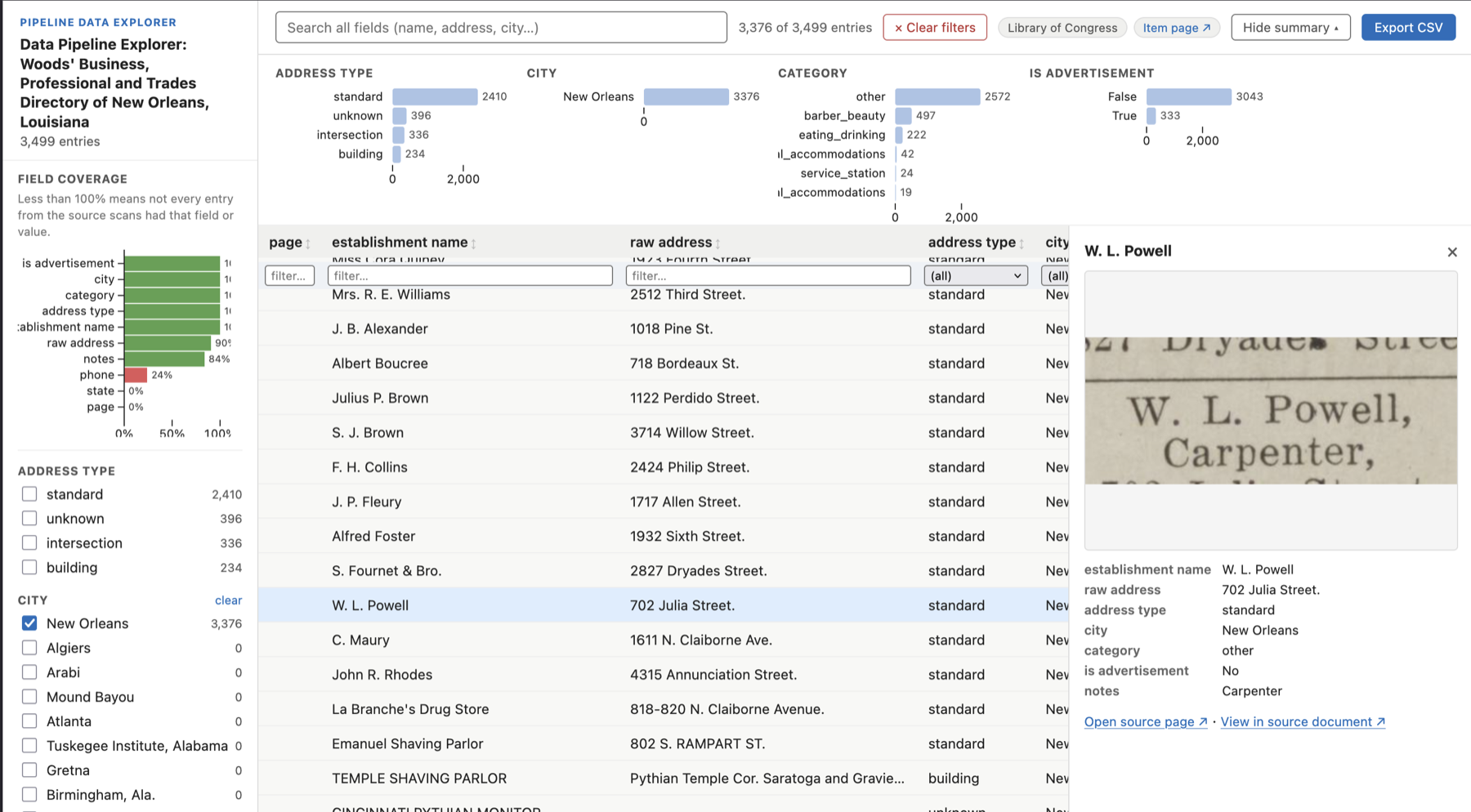
The auto-generated data explorer. Categorical facets generated from the data, full-text search, IIIF page thumbnails, and a “View in source document” deep link for every row.
Quick start
# One-time calibration steps for a new collection type — generates OCR and NER prompts that will work for any item with the same entry structure
python main.py https://archive.org/details/ldpd_11290437_000/ --download
python main.py https://archive.org/details/ldpd_11290437_000/ --select-pages
python main.py https://archive.org/details/ldpd_11290437_000/ --generate-prompts

# "--extract" Automated shortcut — produces entries CSV + browsable HTML explorer for any subsequent volumes in the same series
python main.py https://archive.org/details/ldpd_11290437_000/ --extract
Calibrate once, run many. The first three commands are a one-time step per collection type: --select-pages opens a browser UI where you pick 4–10 representative pages; --generate-prompts has Gemini analyze them and write tailored OCR and extraction prompts. For any additional volume in the same series, point to the relevant NER prompt, and skip calibration entirely:
python main.py https://archive.org/details/ldpd_11290437_001/ --extract \
  --ner-prompt output/ldpd_11290437_000/ner_prompt.md
Requires GEMINI_API_KEY. Can run on the free tier — no billing required for collections up to ~150 pages.
What you get
A CSV where every row is one extracted entry. Field names are driven entirely by your NER prompt — no code changes necessary for a new document or volume of the same type:
| name | address | city | state | category | canvas_fragment |
|---|---|---|---|---|---|
| Mrs. Simmons Tourist Home | 418 Johnson St | Augusta | GA | Tourist Home | https://...#xywh=142,890,1240,68 |
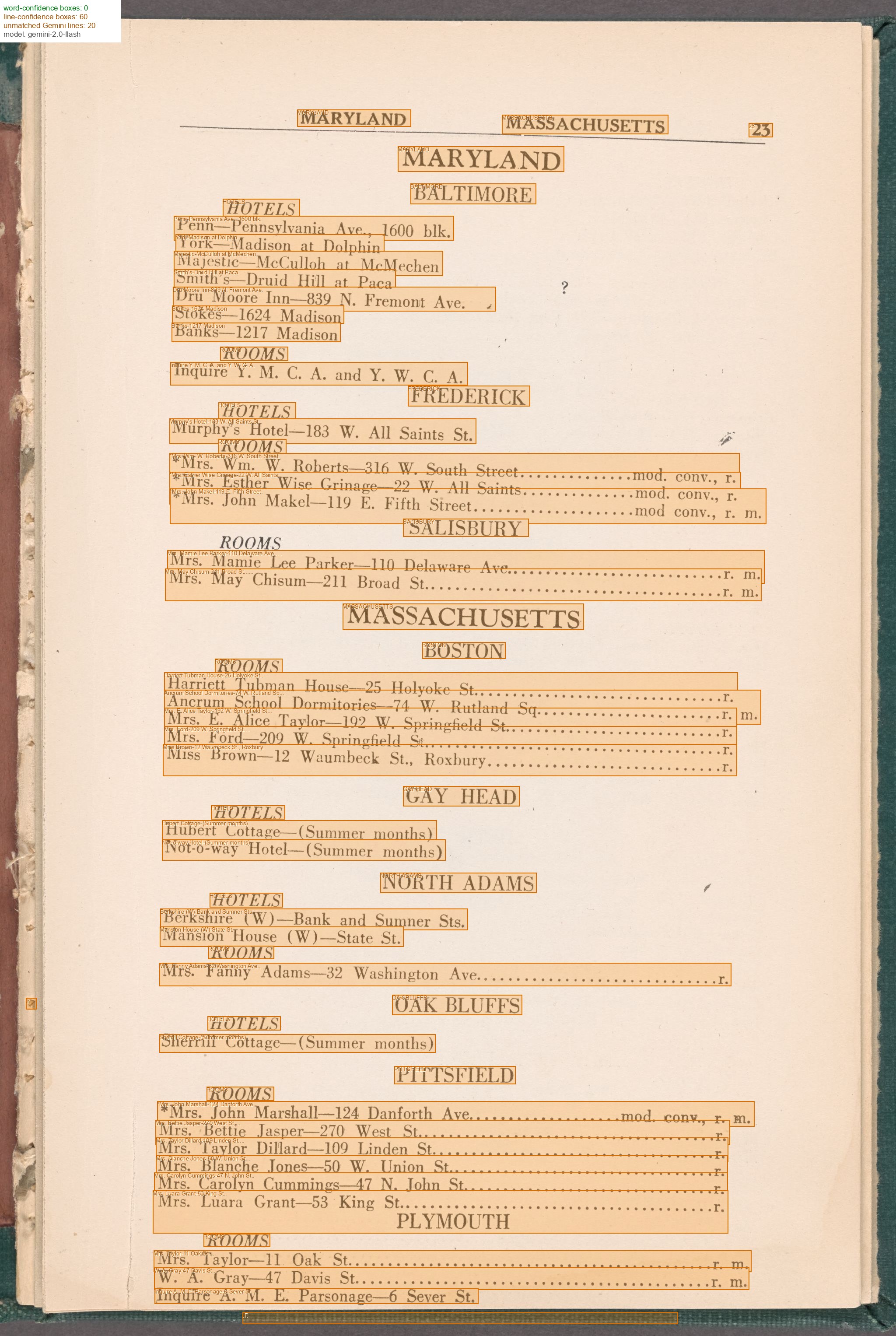
The canvas_fragment column is a IIIF URI pointing back to the source scan. With the precision upgrade, it includes a #xywh= bounding box pinpointing the exact line. The data explorer and map use this to link directly to the highlighted entry in the original document.
Alongside the extracted data CSV, --extract also generates a self-contained HTML data explorer (shown above). With --geocode --map run on materials with address fields, you also get:
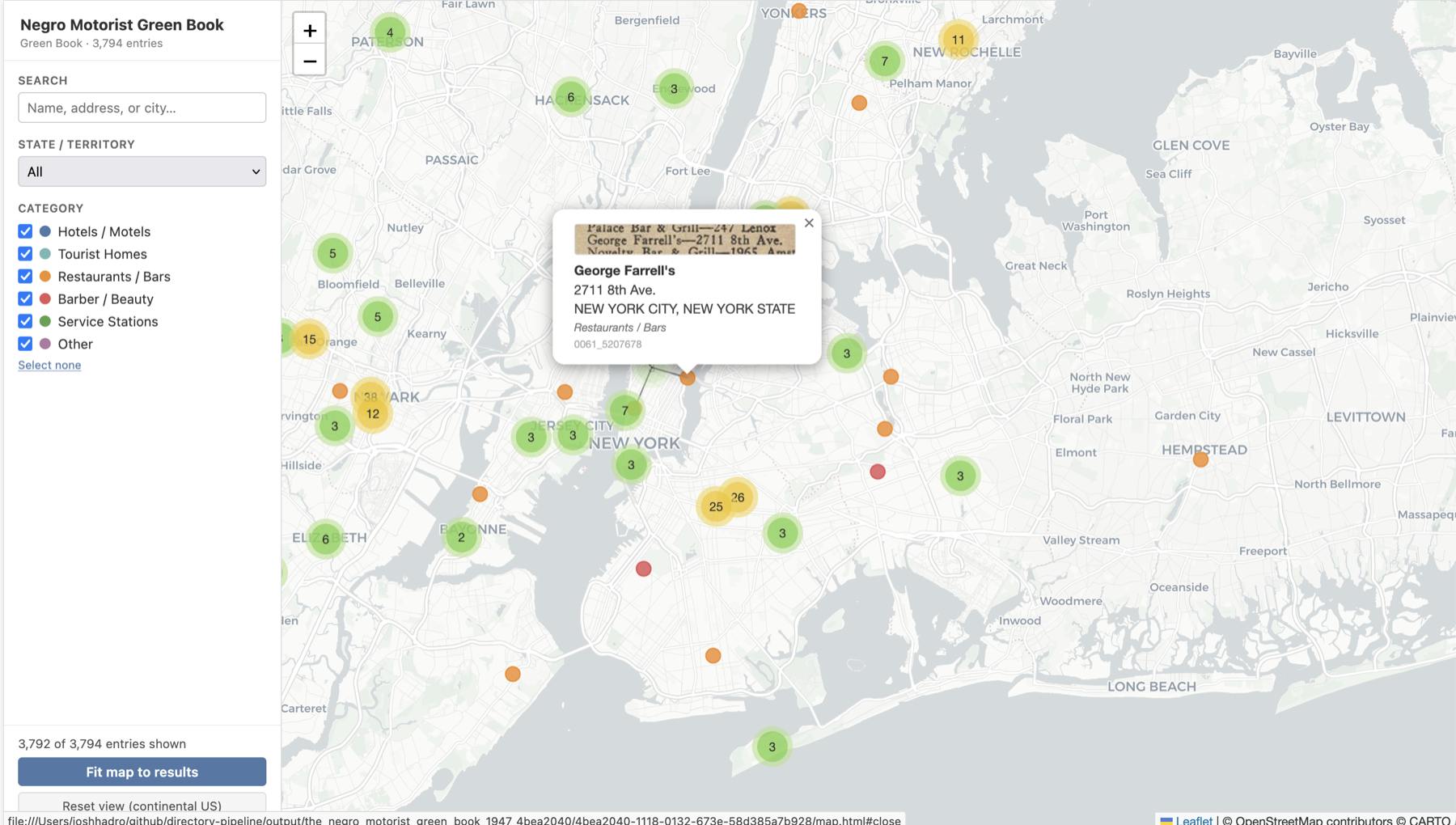
Markers clustered and color-coded by category. Popups include a IIIF thumbnail fetched directly from the source institution’s image server.
Installation
Requires Python 3.11+ and uv.
uv sync                  # core: Gemini OCR + entry extraction
uv sync --extra gpu      # add Surya OCR (GPU or Apple Silicon recommended)
uv sync --extra geo      # add geocoding + map generation
uv sync --all-extras     # everything
Set your API keys (or copy .env.template to .env):
export GEMINI_API_KEY=your_key_here
export NYPL_API_TOKEN=your_token_here      # only needed for NYPL API access
export GOOGLE_MAPS_API_KEY=your_key_here   # optional; enables address-level geocoding
Going further
| Goal | Flags / command |
|---|---|
| Add spatial bounding boxes to every row | --surya-ocr --align-ocr → details |
| Interactively fix unmatched lines | --review-alignment |
| Geocode entries and build a map | --geocode --map |
| Full pipeline with page scoping + alignment review | --guided |
| Export W3C/IIIF annotations | pipeline/iiif/export_annotations.py |
Precision upgrade
The core path (--download --gemini-ocr --extract-entries) gives you a canvas URI per row. Adding --surya-ocr --align-ocr upgrades every canvas_fragment to a #xywh= bounding box — the exact line on the page, usable by any IIIF viewer:
python main.py URL --surya-ocr --align-ocr
python main.py URL --review-alignment     # optional: fix unmatched lines interactively
Costs
A single 100-page volume costs roughly $0.60 in Gemini API charges with a paid account but can run within the free tier’s daily quota (~15–20 minutes at 15 RPM). See docs/costs.md for a full breakdown including platform costs (Surya OCR on Mac, Colab, and GPU).
Docs
- Pipeline stage reference — every flag, script, and output file
- Usage examples — full examples by source (LoC, IA, NYPL, IIIF manifest)
- Costs — API and platform cost breakdown
- Key design decisions — architecture and technical notes
- Prior work — related research and citations
Key design decisions
- Gemini for accuracy, Surya for coordinates. Gemini transcribes historical print far more accurately than conventional OCR; Surya provides line-level bounding boxes that anchor coordinates.
- Anchored Needleman-Wunsch alignment. City/state headings that appear verbatim in both sources are committed as fixed anchors before the NW pass, preventing misalignment drift on long pages.
- Schema-agnostic NER.
extract_entries.pyhard-codes nothing. The NER prompt defines all field names; CSV columns are inferred dynamically — no code changes for a new collection type. - IIIF-native output. Every aligned line and entry carries a
canvas_fragment(#xywh=) URI in natural image pixel coordinates, directly consumable by IIIF viewers and annotation tools. - Any IIIF source.
--iiif-csvand--downloadaccept any public IIIF Presentation v2 or v3 manifest URL, not just NYPL/LoC/IA. IIIF Collection manifests are enumerated automatically, writing one CSV row per child manifest.
See docs/key-design-decisions.md for full technical notes.
Prior work and inspirations
- Greif et al. (2025) — foundational benchmark showing multimodal LLMs beat Tesseract + Transkribus on historical city directories (0.84% CER with Gemini 2.0 Flash). Directly motivates the two-stage OCR + NER architecture. (arXiv:2504.00414)
- Bell et al. — directoreadr (2020) — closest prior work; end-to-end pipeline for Polk city directories using classical CV + Tesseract. Documents the brittle year-specific heuristics this pipeline replaces. (PLOS ONE)
- Fleischhacker et al. (2025) — layout detection as preprocessing improves OCR accuracy by 15+ pp on multi-column historical docs. Motivates column reading-order correction in
align_ocr.py. (Int. J. Digital Libraries) - Cook et al. (2020) — canonical prior Green Books digitization (entirely manual; OCR rejected). Source of the six-category establishment taxonomy used here. (NBER WP 26819)
- Smith & Cordell (2018) — practitioner research agenda naming layout analysis as the top barrier to historical OCR and validating NW-style sequence alignment for ground truth creation. (NEH report)
- Carlson et al. — EffOCR (2023) — OCR benchmarks on historical newspapers (Tesseract ~10.6% CER, fine-tuned TrOCR 1.3%). Establishes the noisy-input baseline for the alignment stage. (arXiv:2304.02737)
- Wolf et al. (2020) — machine-readable NYC directory entries 1850–1890 from NYPL digitizations. Direct precedent for applying this pipeline to city directories. (NYU Faculty Digital Archive)
See docs/prior-work.md for full annotated citations.